
The Unofficial Suzuki SMG4 Guide: How It Works & How To Use It
Post Author:
Salty Bob
Last Updated:
December 22, 2025
Share This:
The Unofficial Suzuki SMG4 Guide: How It Works & How To Use It
Post Author:
Last Updated:
Salty Bob
December 22, 2025
The Unofficial Suzuki SMG4 Guide for 2026
We explain the basic buttons, how to use Troll Mode, and how to fix common readout errors in plain English. If you recently bought a boat with a Suzuki Multi-Function Gauge (SMG4), you might have noticed the operating manual is… dense. It often feels like it was written for an electrical engineer, not a boat owner. This post is the plain-English explanation you actually need. We will cover the very basics of how to press the buttons, and then explain the advanced features like Troll Mode and Fuel Monitoring that make this gauge so powerful.
.
.
Part 1: Basic Operations (Start Here)
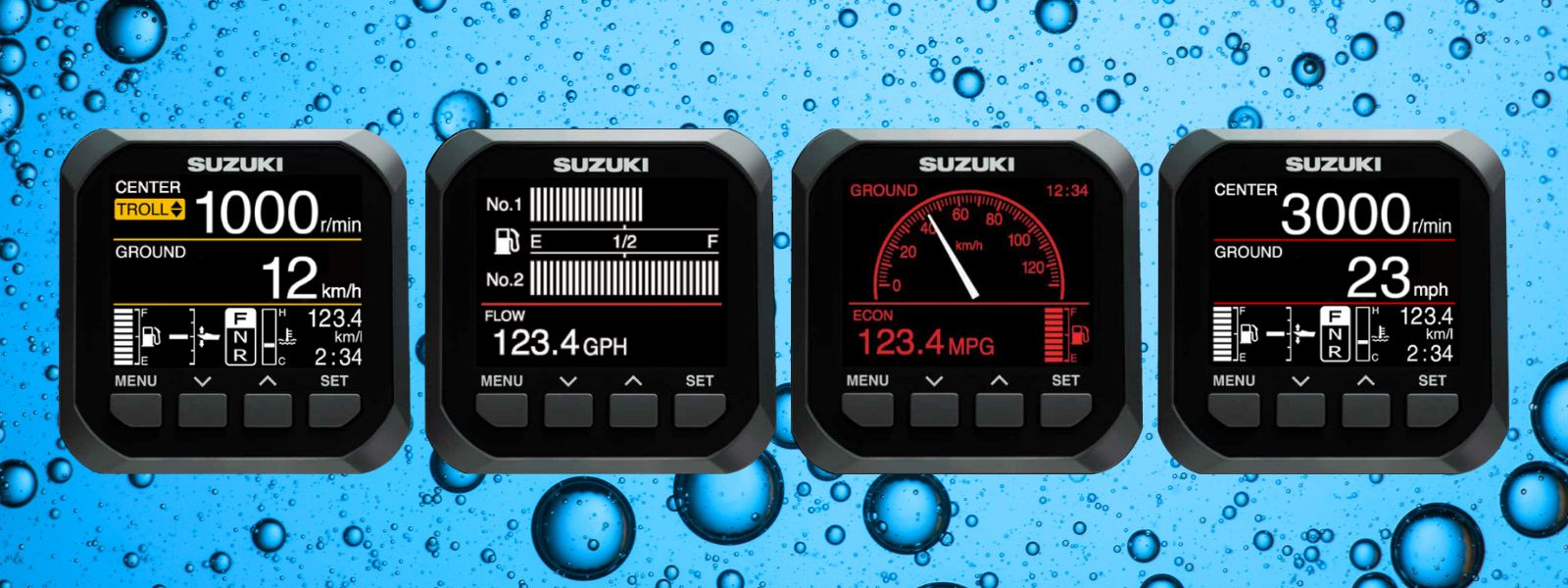
Think of the SMG4 like a smartphone that only has three buttons. You don’t need to be a mechanic to navigate it; you just need to know the rhythm of the buttons.
.
.
The 3 Buttons You Need To Know
• MENU (Left): Think of this as your “Options” button.
• UP / DOWN (Right): Think of these as your “Scroll” buttons.
• SET (Center): Think of this as your “Enter” or “OK” button.
.
.
How to Move Between Screens (The “Page Flip”)
When you turn the key, the gauge turns on. You will see a main screen (usually RPM).
• To see different info: Press the MENU button one time.
• To scroll: Use the UP or DOWN arrows to highlight the page you want (Speed, Fuel, or All Items).
• To select: Press SET to open that page.
Simple Rule: If you get lost in a menu, keep pressing the MENU button to back out until you see the main RPM screen again.
.
.
How to Change Brightness (Day vs. Night)
You don’t need to dig into a menu to stop the screen from blinding you at night.
• Action: Simply press the SET button quickly while on the main screen.
• Result: It toggles instantly between “Day Mode” (White background) and “Night Mode” (Red/Black background).
.
.
How to Reset Your Trip (The “Gas Station” Reset)
Every time you fill up your boat, you should do this so you know exactly how much gas you burn on the next trip.
1. Navigate to the Fuel Screen (using the method above).
2. Look for the number that says “Fuel Used.”
3. Press and HOLD the DOWN arrow.
4. You will hear a beep, and the number will turn to 0.0
.
.
Part 2: What Is The SMG4? (The “Brain” Behind The Screen)
Most new users think the SMG4 is just a fancy tachometer. It isn’t. It is a digital terminal that talks directly to your engine’s computer (ECU). Why does this matter?
- Old Gauges: Read simple electrical signals. If a wire was loose, the needle wobbled.
- SMG4: Reads digital code. If you see a “Check Engine” alert, it’s not a guess—it is a specific code coming from the engine’s brain telling you exactly what is wrong.
The Two Types of Data It Shows
To understand the gauge, you have to understand where the numbers come from.
- ECU Data (Extremely Accurate): RPM, Engine Temp, Engine Hours, Fuel Flow (gph), and Voltage. This data is always correct because it comes from the engine itself.
- Sensor Data (Requires Setup): Fuel Level (tank float), Trim position, and Speed. If these look wrong, it’s usually because the sensor isn’t set up in the gauge’s menu, not because the gauge is broken.
.
.
Part 3: The Feature You’ll Actually Use (Troll Mode)
If you fish, this is the #1 reason to own this gauge. Troll Mode allows you to adjust your trolling speed in 50 RPM increments without touching the throttle lever. It is far more precise than your hand.
How to Activate Troll Mode
Start the engine and ensure it is warmed up.
Shift the boat into Forward (Idle). (You cannot activate it in Neutral).
Press and HOLD the MENU button for 3 seconds.
The screen will beep and switch to the Troll Mode Display (RPM only).
Use the UP/DOWN arrows to adjust speed. (e.g., bump it from 700 to 750, 800, etc.).
To Exit: Simply accelerate with the throttle lever (go past 3000 RPM) or shift back to Neutral. The gauge automatically returns to the normal screen.
.
.
Suzuki SMG4 FAQ
Helpful Youtube Videos on the Suzuki SMG4
.
.
.
.
The Unofficial Suzuki SMG4 Guide for 2026
We explain the basic buttons, how to use Troll Mode, and how to fix common readout errors in plain English. If you recently bought a boat with a Suzuki Multi-Function Gauge (SMG4), you might have noticed the operating manual is… dense. It often feels like it was written for an electrical engineer, not a boat owner. This post is the plain-English explanation you actually need. We will cover the very basics of how to press the buttons, and then explain the advanced features like Troll Mode and Fuel Monitoring that make this gauge so powerful.
.
.
Part 1: Basic Operations (Start Here)
Think of the SMG4 like a smartphone that only has three buttons. You don’t need to be a mechanic to navigate it; you just need to know the rhythm of the buttons.
.
.
The 3 Buttons You Need To Know
• MENU (Left): Think of this as your “Options” button.
• UP / DOWN (Right): Think of these as your “Scroll” buttons.
• SET (Center): Think of this as your “Enter” or “OK” button.
.
.
How to Move Between Screens (The “Page Flip”)
When you turn the key, the gauge turns on. You will see a main screen (usually RPM).
• To see different info: Press the MENU button one time.
• To scroll: Use the UP or DOWN arrows to highlight the page you want (Speed, Fuel, or All Items).
• To select: Press SET to open that page.
Simple Rule: If you get lost in a menu, keep pressing the MENU button to back out until you see the main RPM screen again.
.
.
How to Change Brightness (Day vs. Night)
You don’t need to dig into a menu to stop the screen from blinding you at night.
• Action: Simply press the SET button quickly while on the main screen.
• Result: It toggles instantly between “Day Mode” (White background) and “Night Mode” (Red/Black background).
.
.
How to Reset Your Trip (The “Gas Station” Reset)
Every time you fill up your boat, you should do this so you know exactly how much gas you burn on the next trip.
1. Navigate to the Fuel Screen (using the method above).
2. Look for the number that says “Fuel Used.”
3. Press and HOLD the DOWN arrow.
4. You will hear a beep, and the number will turn to 0.0
.
.
Part 2: What Is The SMG4? (The “Brain” Behind The Screen)
Most new users think the SMG4 is just a fancy tachometer. It isn’t. It is a digital terminal that talks directly to your engine’s computer (ECU). Why does this matter?
- Old Gauges: Read simple electrical signals. If a wire was loose, the needle wobbled.
- SMG4: Reads digital code. If you see a “Check Engine” alert, it’s not a guess—it is a specific code coming from the engine’s brain telling you exactly what is wrong.
The Two Types of Data It Shows
To understand the gauge, you have to understand where the numbers come from.
- ECU Data (Extremely Accurate): RPM, Engine Temp, Engine Hours, Fuel Flow (gph), and Voltage. This data is always correct because it comes from the engine itself.
- Sensor Data (Requires Setup): Fuel Level (tank float), Trim position, and Speed. If these look wrong, it’s usually because the sensor isn’t set up in the gauge’s menu, not because the gauge is broken.
.
.
Part 3: The Feature You’ll Actually Use (Troll Mode)
If you fish, this is the #1 reason to own this gauge. Troll Mode allows you to adjust your trolling speed in 50 RPM increments without touching the throttle lever. It is far more precise than your hand.
How to Activate Troll Mode
Start the engine and ensure it is warmed up.
Shift the boat into Forward (Idle). (You cannot activate it in Neutral).
Press and HOLD the MENU button for 3 seconds.
The screen will beep and switch to the Troll Mode Display (RPM only).
Use the UP/DOWN arrows to adjust speed. (e.g., bump it from 700 to 750, 800, etc.).
To Exit: Simply accelerate with the throttle lever (go past 3000 RPM) or shift back to Neutral. The gauge automatically returns to the normal screen.
.
.
Suzuki SMG4 FAQ
Helpful Youtube Videos on the Suzuki SMG4
.
.
.
.